
Don’t Click Yet: How to Recognize a Phishing Scam Fast
A beginner-friendly guide to spotting fake links, urgent emails, and social engineering tricks.

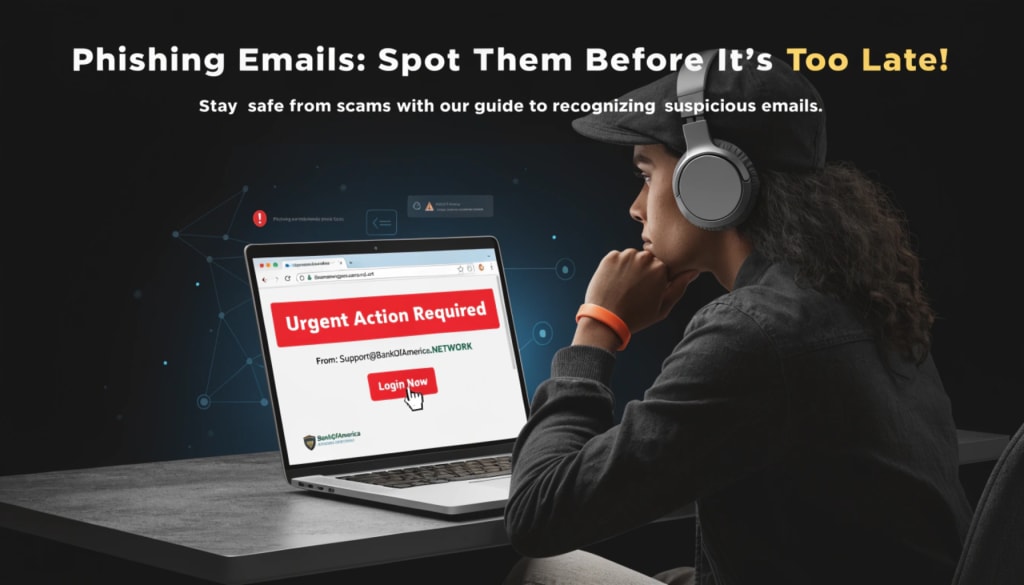
Phishing scams are not new. But they are getting smarter.
Today, you can receive an email that looks exactly like it came from Google.
You might get a message that looks like it came from PayPal.
Or even a login alert that appears to be from Microsoft.
Everything looks normal.
- The logo is correct.
- The colors are correct.
- The message feels urgent.
And that is the problem.
Phishing does not rely on hacking your system first. It relies on tricking you.
In this guide, I will show you how phishing works, the red flags you should never ignore, and the simple checks you can do before clicking any link.
Let’s break it down step by step.
What Is a Phishing Scam?
Phishing is a type of cyber attack where someone pretends to be a trusted company, service, or person to steal your information.
Usually, they want:
- Your password
- Your email login
- Your banking details
- Your OTP codes
- Your business credentials
Instead of breaking into your system, they convince you to open the door for them.
That is why phishing is so dangerous. It targets human behavior, not just software.
Why Phishing Still Works
You might think, “I would never fall for that.” But phishing works because it uses Urgency, Fear, Curiosity, and Authority.
For example:
- “Your account will be suspended in 1 hour.”
- “Unusual login attempt detected.”
- “Invoice attached. Please review.”
- “You won a prize.”
When you feel pressure, you act fast.
And when you act fast, you don’t inspect carefully.
That small emotional reaction is what attackers depend on.
The 7 Fast Checks Before You Click Any Link
Before you click any link in an email, message, or social media DM, pause for 10 seconds and check these things.
1. Check the Sender’s Email Address Carefully
Do not just read the display name.
Attackers can write:
Microsoft Support
But the real email could be:
That is not official.
Always check the full email address. Real companies do not use random free email domains for official communication.
2. Hover Over the Link (Do Not Click)
On desktop, move your mouse over the link without clicking.
Look at the bottom of your browser.
If it says:
microsoft-security-login.xyz
That is a red flag.
Official domains are usually clean and simple, like:
- microsoft.com
- paypal.com
- google.com
Attackers often add extra words, hyphens, or strange domain endings.
3. Watch for Urgent Language
Phishing messages often use pressure tactics:
- “Act now.”
- “Final warning.”
- “Immediate action required.”
- “Your account will be deleted.”
Real companies do not usually threaten you in one short email.
Urgency is one of the biggest phishing signals.
4. Look for Small Grammar Mistakes
Many phishing emails still contain; Strange sentence structure, Random capitalization, Slight spelling errors, Unnatural wording.
It might look professional at first glance, but read it slowly. Something usually feels off.
Trust that instinct.
5. Be Careful With Attachments
Never open unexpected attachments. Especially files like .zip, .html, .exe, .scr. These can install malware on your system.
If you did not request the file, do not open it.
6. Never Enter Credentials From an Email Link
This is very important.
If you receive a login alert from Google, PayPal, or your bank, do not click the link inside the email.
Instead:
- Open a new browser tab.
- Manually type the official website address.
- Log in from there.
If there is a real problem, you will see it inside your account dashboard.
This one habit alone can protect you from most phishing attacks.
7. Enable Two-Factor Authentication (2FA)
Even if your password gets stolen, 2FA can stop attackers.
With 2FA enabled You need a second code usually from your phone or authenticator app.
So even if someone gets your password, they cannot log in easily.
Always enable 2FA on:
- Email accounts
- Cloud storage
- Banking apps
- Business accounts
- Admin dashboards
This is basic cybersecurity hygiene.
Phishing Is Not Just Email Anymore
Most people think phishing only happens in email. That is not true anymore.
Now you can get phishing through; SMS messages (Smishing), Phone calls (Vishing), Social media DMs, Fake job offers, Fake cryptocurrency investments, Fake business invoices
Attackers adapt to where users are active. If you are active on social media, they will target social media. If you run a business, they will target invoices and payments.
Always stay alert.
What To Do If You Already Clicked
If you already clicked a suspicious link, do not panic.
Here is what to do immediately:
- Disconnect from the internet.
- Do not enter any information.
- Run a full antivirus scan.
- Change your passwords from a clean device.
- Enable 2FA if it was not enabled.
If you entered your banking information, contact your bank immediately. Act fast. The faster you respond, the lower the damage.
Small Businesses Are Big Targets
If you run a small business, phishing is one of the easiest ways attackers can access your system.
Why?
Because small teams:
- Share passwords
- Reuse passwords
- Do not use 2FA everywhere
- Trust invoice emails
One employee clicking one fake invoice can expose your entire company.
Train your team.
Create a simple rule:
No one clicks suspicious links without verifying first.
That small internal policy can prevent serious damage.
Build the Habit: Pause Before You Click
Cybersecurity is not only about tools.
It is about habits.
The most powerful habit you can build is this:
Pause before clicking.
Ten seconds of checking can save you months of recovery.
Conclusion
Phishing scams are designed to look normal, professional, urgent, and real.
But most of them fail under careful inspection.
You do not need to be a cybersecurity expert to stay safe.
You just need:
- Awareness
- Slower reactions
- Simple verification habits
Next time you receive an urgent email, remember this:
Don’t click yet. Check first.
About the Creator
Stephano kambeta
I specialize in breaking down complex cybersecurity trends into actionable privacy steps for everyday users and small businesses. My goal is to help you stay safe in an increasingly connected world.
Keep reading
More stories from writers in Education and other communities.
Strengthening Local Health Systems Through Emergency Department and NGO Partnerships
Emergency departments are often the first point of contact for individuals experiencing acute illness or injury. They operate continuously, providing life saving interventions and stabilizing patients in critical moments. However, improving overall community health requires more than high-quality emergency treatment. It demands coordinated action that addresses prevention, follow-up care, and the broader conditions influencing health outcomes.
By Dr. Seth Eidemiller5 days ago in Education
This Is What I Do When People Throw Rocks At Me
Rocks have been thrown at me for a greater part of my life. Some have been small and missed hitting me. When people don't get a reaction from me, they throw bigger rocks with a better aim. Many have been hurled at me with precision over the years. For a long time, I thought my only options were to dodge them or be crushed by them.
By Margaret Minnicks5 days ago in Confessions
me, me, me
when i read back my poetry it screams “me, me, me” on my screen in bold letters and i can’t shut it up — most days, i cannot make any other words out; i want to throttle a thousand versions of the me gone by, i want to throw myself from a figurative balcony, i want to sink a sword into every pen i’ve held
By angela hepworth5 days ago in Poets


Comments
There are no comments for this story
Be the first to respond and start the conversation.