
How to Balance Internal & External Port Loads on a Fibre Channel Network Switch
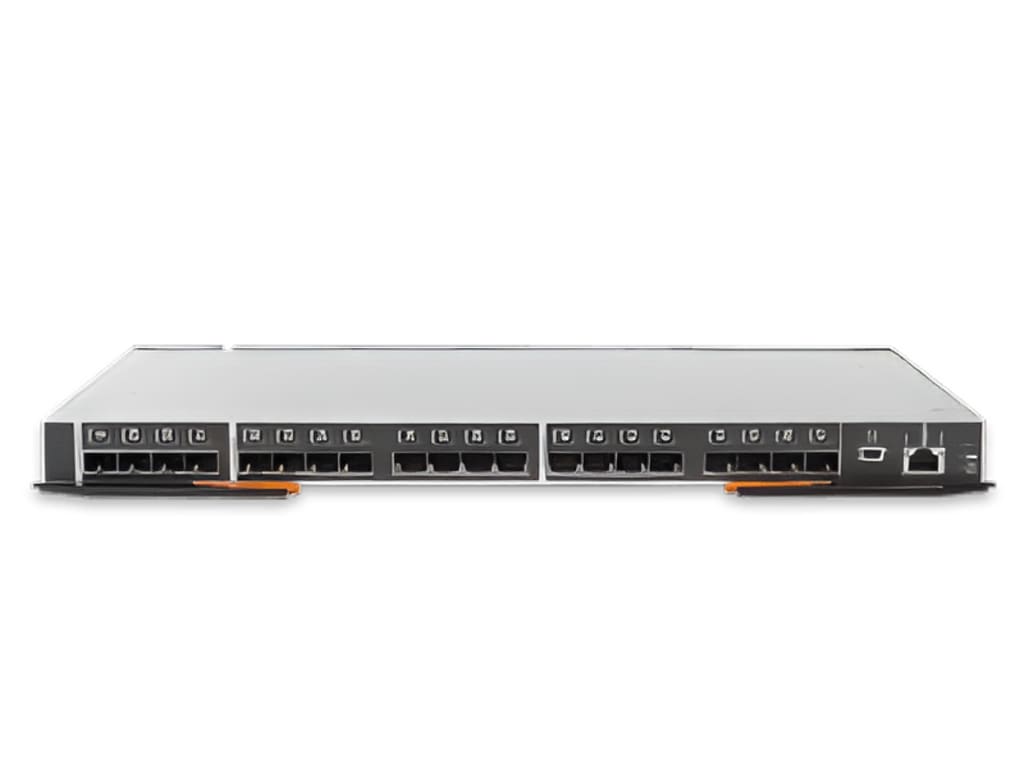
A fibre channel network switch is a high-speed networking device used in storage area networks (SANs) to connect servers and storage systems, enabling fast and reliable data transfer.

Modern data centers depend on steady storage performance every hour of the day. As your workloads grow your storage traffic also grows and that traffic must move smoothly across your switching layer.
Therefore, you need to understand how traffic flows inside and outside each fibre channel network switch so that no single path carries more load than it should. When internal ASIC paths become crowded or when external ports face uneven demand, performance begins to drop and latency starts to rise. As a result, applications respond slowly and business users feel the impact.
So you must follow clear methods that help you observe traffic patterns, distribute workloads evenly and maintain long term stability. The following seven ways will help you balance internal and external port loads with confidence and control.
1. Understand Internal ASIC Architecture and Port Groups
You must first understand how your switch handles traffic internally because physical ports connect to internal ASICs in specific groups. Each ASIC manages a set of ports and shares internal bandwidth among them. Therefore if you connect too many high traffic devices to ports that belong to the same ASIC group you create internal congestion even if other ports remain underused.
Reviewing your fibre channel switch layout helps you understand port groups and bandwidth allocation clearly. A fibre channel network switch is built to optimize performance by allowing multiple ports to work together through shared switching chips and structured internal data paths.
By identifying which ports belong to the same ASIC group, you develop a clear and confident understanding of how traffic flows smoothly inside the switch and how to strategically balance workloads for maximum performance and stability.
2. Distribute High Bandwidth Devices Across Port Groups
After you understand the internal layout, you must distribute high-bandwidth devices carefully. Storage arrays and backup targets often generate large bursts of traffic. Therefore, you should avoid connecting all high-throughput devices to adjacent ports that share the same internal resources.
Key Distribution Practices
- Place storage array front-end ports on different ASIC groups
- Spread host connections across multiple line cards if available
- Avoid stacking heavy traffic initiators on the same internal path
- Review port speed alignment so that 32G or 64G ports do not overload one group
When you follow these steps, you create balance both internally and externally. As traffic increases, the load spreads evenly and reduces the risk of localized congestion.
3. Monitor Real-Time Port Utilization
Balancing loads requires visibility because you cannot fix what you cannot see. Therefore, you must monitor real time port utilization on every Fibre Channel network switch in your fabric. Most enterprise switches provide performance counters that show throughput, buffer credits and latency.
When you review these metrics regularly, you can detect patterns such as sustained high utilization on specific ports. Then you can compare that data with internal port group mapping. If one group shows consistent saturation while others remain underused, you know that redistribution will improve performance.
Moreover, regular monitoring helps you catch growth trends early. As a result, you can rebalance workloads before congestion affects production systems. This proactive approach protects application performance and builds trust with business teams.
4. Balance ISL Traffic Between Switches
Internal load balancing alone does not solve the full challenge because inter-switch links also carry heavy traffic. When multiple switches form a fabric, ISLs move traffic between domains. Therefore, uneven ISL utilization can create bottlenecks even if local ports remain balanced.
To address this issue you should examine ISL trunking and path selection policies.
Effective ISL Balancing Actions
- Enable trunking where supported so that multiple links act as one logical channel
- Distribute ISLs across different ASICs to prevent internal choke points
- Monitor ISL throughput and adjust link counts when utilization stays high
- Align zoning practices with ISL capacity planning
When you apply these actions, you ensure that east-west traffic flows evenly across the fabric. Consequently, your overall fibre channel network switch design remains stable and scalable.
5. Optimize Zoning to Prevent Traffic Concentration
Zoning plays a direct role in load distribution because it defines which hosts talk to which storage targets. Poor zoning design can concentrate traffic through specific ports and ISLs. Therefore, you should design zones that align with balanced connectivity.
For example you can distribute host initiators across multiple storage target ports instead of mapping all hosts to a single target interface. In addition, you can separate high-demand applications into different zones that leverage different physical paths.
When you align zoning with physical port distribution you reduce the risk of traffic clustering. As a result both internal switching resources and external links operate within healthy limits. This structured zoning strategy supports predictable growth and avoids sudden congestion spikes.
6. Use Load Based Port Planning During Expansion
As your environment grows you will add new hosts and storage systems. At that stage careful planning becomes critical because reactive expansion often leads to imbalance. Therefore you should review current utilization data before assigning new connections.
You can follow a simple planning process.
Expansion Planning Checklist
- Review current ASIC group utilization
- Identify ports with sustained high throughput
- Select underused port groups for new device connections
- Validate ISL capacity before enabling new workloads
When you apply this checklist you treat expansion as a controlled process rather than a quick fix. Over time this discipline keeps the internal fabric of every fibre channel network switch evenly loaded and ready for future demand.
7. Implement Quality of Service Policies
In environments with mixed workloads some applications generate more traffic than others. Therefore you can use quality of service features to manage priority and bandwidth allocation. QoS helps you prevent a single workload from overwhelming shared resources.
When you configure traffic classes based on application importance you guide how the switch allocates internal buffers and bandwidth. As a result critical workloads maintain stable performance even during peak activity.
Furthermore QoS works best when combined with physical load balancing. While physical distribution spreads traffic across ports QoS ensures that high value applications receive consistent service levels. Together these controls create a balanced and resilient switching environment.
Conclusion
Balancing internal and external port loads on a fibre channel network switch requires knowledge observation and disciplined planning. First you must understand how ports map to internal ASICs. Then you distribute high bandwidth devices across those groups to prevent hidden congestion.
When you follow these seven ways you protect performance at every layer of your storage fabric. As traffic grows your network continues to respond with stability rather than stress. More importantly your business applications receive the consistent speed and reliability they need to operate smoothly.
When you treat each fibre channel network switch as a critical performance engine you build a storage network that supports both today’s demand and tomorrow’s growth with confidence and control.
About the Creator
Harry Cmary
Hi, I'm Harry, a tech expert who loves writing about technology. I share simple and useful information about the latest gadgets, trends, and innovations to help everyone understand and enjoy the world of tech.
Keep reading
More stories from Harry Cmary and writers in Education and other communities.
How to Optimize Content for Google’s AI Search Results
Google search no longer behaves like a filing cabinet. It acts more like a junior analyst reading pages, weighing meaning, and assembling responses on demand. AI driven search results pull from context, intent, and language patterns rather than isolated keywords. That shift rewrites the rules for content creation. Pages now compete inside a probabilistic model that favors clarity, authority, and semantic depth.
By Harry Cmary28 days ago in Education
Smart Strategies for Scaling a Coffee Bar Business
A thriving neighborhood coffee bar often begins with a simple mission: serve great coffee and create a welcoming place for people to gather. However, growth quickly introduces new challenges. Higher customer demand, operational complexity, and the need for consistent quality can stretch even the most passionate owners. Therefore, building a clear strategy early helps transform a small shop into a sustainable brand.
By Alexander Schifter4 days ago in Education
Using 3D Laser Scanning for Accurate Facility Upgrade and Renovation Planning
Facility upgrades and renovation projects require precise knowledge of existing building conditions. Many older facilities lack reliable documentation, and outdated drawings can lead to design conflicts, costly change orders, and construction delays.
By Matt Sharon4 days ago in Education



Comments
There are no comments for this story
Be the first to respond and start the conversation.